What is that part of a website called?
The bar across the top, the links at the bottom, the column down the side, the big picture on the home page, the little icon in the tab — every part of a web page has a name. Here they all are, with the words people search with and what code calls them.
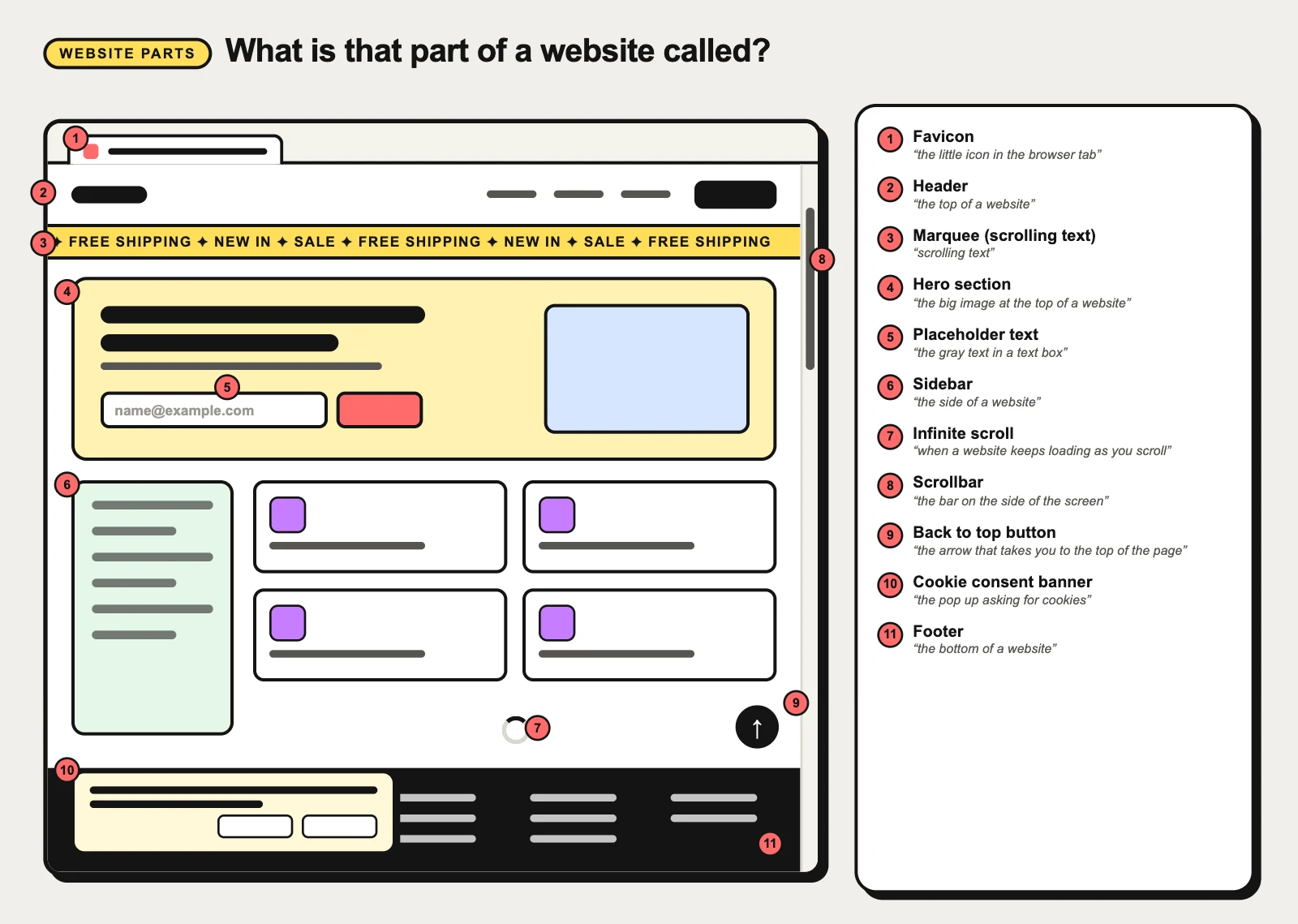
The frame of every page
Most websites share one skeleton: a header across the top, a footer across the bottom, sometimes a sidebar down one side, and around it the browser’s own tab icon and scrollbar.
Header
“the top of a website”
The band across the top of every page of a website: the logo on one side, the main navigation links in the middle or on the right, and often search, sign-in or a call-to-action button. The navigation inside it is the navbar.
Footer
“the bottom of a website”
The band across the bottom of every page of a website: secondary links (About, Contact, Careers), legal pages, social icons, copyright and sometimes a newsletter sign-up. It is where people scroll when they cannot find something in the header.
Sidebar
“the side of a website”
A column down the left or right side of a page, beside the main content. On the left it usually holds navigation (dashboards, docs, admin tools); on the right, related content — filters, a table of contents, ads or “more like this”.
Scrollbar
“the bar on the side of the screen”
The thin bar along the edge of a scrolling area that shows how far down you are and how much is left. The part you drag is the thumb; the groove it slides in is the track. Phones and Macs often hide it until you scroll.
Favicon
“the little icon in the browser tab”
The small icon a website shows in the browser tab, beside bookmarks and in history — usually a simplified version of the logo. The same image, at larger sizes, becomes the shortcut icon when someone adds the site to a phone’s home screen.
On a landing page
Home and landing pages add a few parts of their own: a big opening block, sometimes a strip of sliding text, and on a first visit, the cookie question.
Hero section
“the big image at the top of a website”
The first big block of a landing page, right under the header: a headline that says what the product is, a line of support, one or two call-to-action buttons and usually a large image or video. It is the part people see before they scroll.
Marquee (scrolling text)
“scrolling text”
A strip of text or logos that slides continuously sideways across the screen — a news ticker, a stock ticker, a row of client logos, a sale announcement. Eye-catching, but moving text is hard to read and must be pausable.
Cookie consent banner
“the pop up asking for cookies”
The bar or box a website shows on your first visit to ask whether it may use cookies — usually with Accept, Reject and a link to choose by category. It exists for privacy law, so its buttons have rules: refusing must be as easy as accepting.
On long pages and lists
When a page or a list goes on and on, two patterns decide how it ends and how you get back.
Infinite scroll
“when a website keeps loading as you scroll”
A list or feed that loads the next batch of items automatically as you near the bottom, so the page seems never to end. Feeds love it; pages where people need to find, compare or reach the footer often do not.
Back to top button
“the arrow that takes you to the top of the page”
A small button, usually an up arrow in a corner, that appears after you scroll down a long page and takes you back to the top in one tap. It saves a long scroll back to the header and its navigation.
In forms
The grey words inside an empty field have their own name — and their own rules.
Placeholder text
“the gray text in a text box”
The grey hint inside an empty text field — “Search products”, “name@example.com” — that disappears as soon as you type. It shows an example or format; it is not a label, because it vanishes exactly when people need it.
More parts you will see on websites
- Hamburger menu — “the three lines menu icon”
- Breadcrumb — “the Home › Category › Page links at the top”
- Pagination — “the page numbers at the bottom”
- Alert banner — “the bar across the top of a website”
- Search field — “the search bar”
- Card — “a box with an image, a title and a short text”
- Carousel — “an image slider”
- Modal dialog — “a pop-up window that blocks the page”
For the bars and panels that belong to the phone or computer rather than the website, see what each part of a phone and computer screen is called.
Not sure which one you are looking at?
Take a screenshot of the page and upload it to CatchUI: it boxes each element it recognises and gives its conventional name, the visible evidence behind the match, and a card you can keep. Or browse the UI pattern catalog.
Common questions
What are the parts of a website called?
From the top: the favicon in the browser tab, the header with the logo and navigation bar, often an announcement bar or marquee, the hero section on a landing page, the main content with an optional sidebar beside it, and the footer at the bottom. The scrollbar runs down the edge, and floating on top you may see a cookie consent banner and a back to top button.
What is the top of a website called?
The header. It holds the logo, the main navigation (the navbar) and often search or sign-in. A thin strip above it with a notice or a sale is an announcement bar; the big block just below it on a landing page is the hero section.
What is the bottom of a website called?
The footer — the band at the bottom of every page with secondary links, legal pages, social icons and the copyright line.
What is the end of a website address called, like .com?
The top-level domain, or TLD: .com, .org, .net, or a country code such as .uk or .cn. The name before it (example in example.com) is the domain name, and www is a subdomain. These are parts of the web address, not of the page.
What are the sections of a landing page called?
Usually: a hero section, a row of logos or reviews for social proof, feature sections, a pricing table, an FAQ (often an accordion), a final call-to-action block and the footer. The names vary by team, but hero, social proof, features, pricing, FAQ and CTA are the common ones.