What is that part of your phone screen called?
The bar at the top, the line at the bottom, the menu you swipe down, the three buttons on Android, the strip along the bottom of a computer — every one has a proper name. Here they all are for iPhone, Android, Mac and Windows.
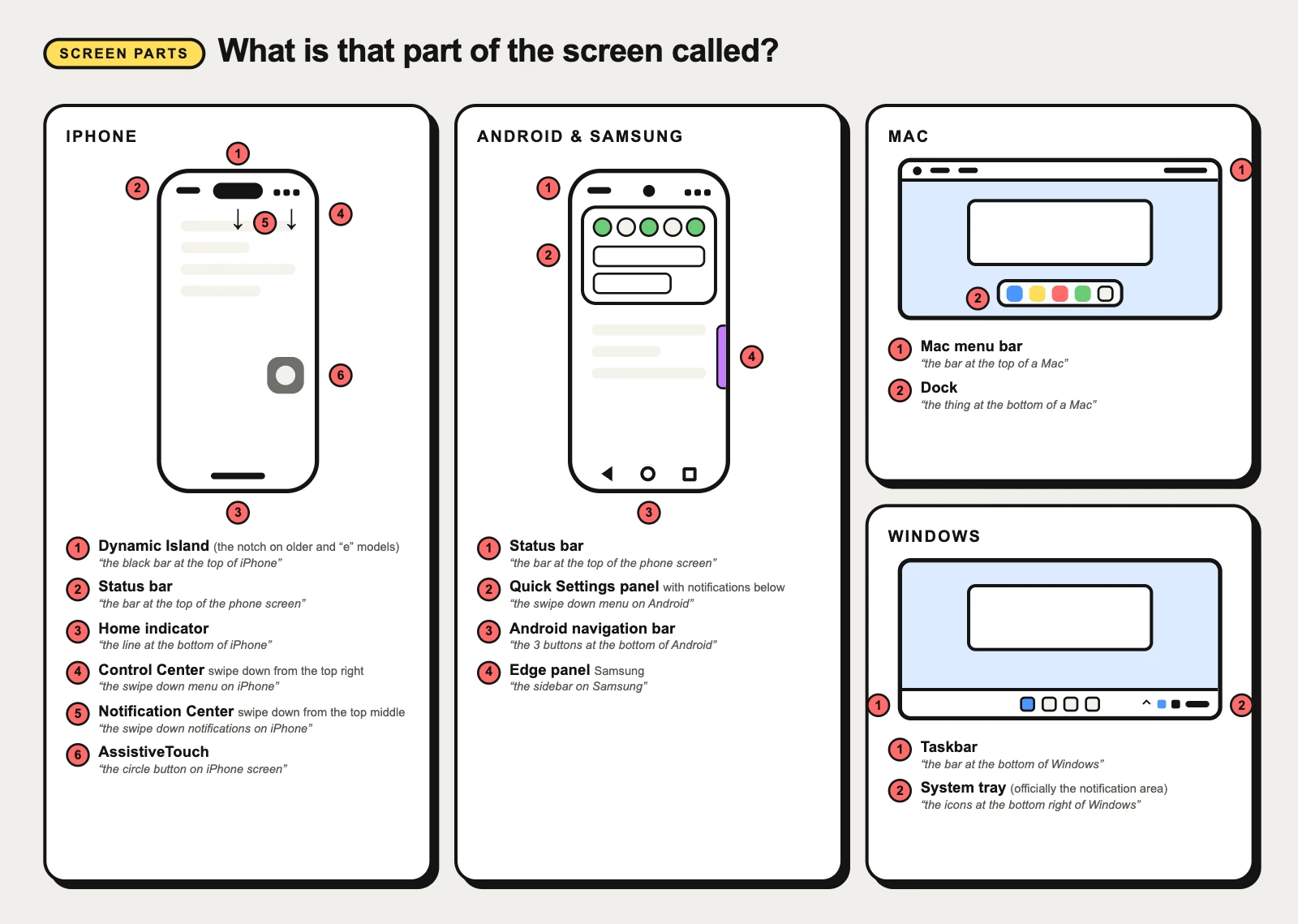
iPhone screen parts
On an iPhone the system owns the top and bottom edges: the status bar and the Dynamic Island (or notch) above, the home indicator below, and two pull-down panels that open from the top.
Dynamic Island
“the black bar at the top of iPhone”
The black pill at the top of newer iPhones that hides the front camera and grows to show live activity — a call, a timer, music, directions. Apple turned a hole in the screen into a place for status.
Status bar
“the bar at the top of the phone screen”
The thin strip along the top of a phone screen with the time, signal, Wi-Fi and battery. It belongs to the system, not the app — an app only chooses whether its icons are light or dark.
Notch
“the notch on iPhone”
The black cutout at the top edge of the screen that holds the front camera and Face ID sensors. The screen wraps around it, so the status bar is split into two “ears”, one on each side.
Home indicator
“the line at the bottom of iPhone”
The thin line at the bottom of iPhones without a Home button. It is not decoration: swipe it up to go home, up and hold for the app switcher, sideways to jump between apps.
Control Center
“the swipe down menu on iPhone”
The panel of shortcuts you pull down from the top-right corner of an iPhone: Wi-Fi, Bluetooth, brightness, volume, flashlight, timer. The settings you touch every day, one swipe from any screen.
Notification Center
“the swipe down notifications on iPhone”
The list of notifications you pull down from the top of an iPhone, grouped by app, newest first. Anything you did not deal with on arrival waits here until you clear it.
AssistiveTouch
“the circle button on iPhone screen”
The floating grey circle some iPhone screens show: an accessibility shortcut that opens a menu for Home, Control Center, screenshots and gestures. Someone turned it on in Settings — it is not a glitch.
Android and Samsung screen parts
Android phones share the status bar idea with iPhone, but put Back, Home and Recents in a navigation bar at the bottom and fold notifications and toggles into one pull-down shade. Samsung adds an Edge panel on the side.
Quick Settings panel
“the swipe down menu on Android”
The grid of toggles at the top of the Android pull-down shade — Wi-Fi, Bluetooth, flashlight, rotation, Do Not Disturb. Swipe down once for a short row, twice for the full panel; Samsung calls it the Quick panel.
Android navigation bar
“the 3 buttons at the bottom of Android”
The strip at the bottom of an Android screen with the Back, Home and Recents buttons — or, with gesture navigation, just a thin handle. It belongs to the system, not the app; an app’s own tabs sit above it.
Edge panel
“the sidebar on Samsung”
Samsung’s sidebar: a small handle on the edge of the screen that slides out a panel of favourite apps, contacts or tools from any screen. A shortcut drawer that belongs to the phone, not to the app you are in.
Mac screen parts
A Mac splits the job in two: menus and status icons in the menu bar along the top, apps in the Dock along the bottom.
Mac menu bar
“the bar at the top of a Mac”
The strip across the top of a Mac screen: the Apple menu and the menus of whichever app is in front, then status icons, Control Center and the clock on the right. The menus change with the app; the bar itself never moves.
Dock
“the thing at the bottom of a Mac”
The row of app icons along the bottom (or side) of a Mac screen: apps you keep there, open apps, recent apps, then the Downloads folder and the Trash. Click to open; a dot underneath means the app is running.
Windows screen parts
Windows puts almost everything in one taskbar along the bottom, with system status and background apps gathered in the corner on the right.
Taskbar
“the bar at the bottom of Windows”
The bar along the bottom of a Windows screen: the Start button, search, pinned and open apps, and on the right the notification area with Wi-Fi, volume, battery and the clock. One click switches to any open window.
System tray
“the icons at the bottom right of Windows”
The corner at the right end of the Windows taskbar with Wi-Fi, volume, battery, the clock and the icons of apps running in the background. Microsoft’s official name is the notification area; the small up arrow beside it shows hidden icons.
Not sure which one you are looking at?
Take a screenshot and upload it to CatchUI: it boxes each element it recognises and gives its name, the visible evidence behind the match, and a card you can keep. For app screens rather than the system around them, the UI pattern catalog names the parts inside the app — tab bars, bottom sheets, toasts and more.
Common questions
What are the parts of a phone screen called?
Along the top is the status bar (time, signal, battery), around the front camera on iPhone the Dynamic Island or the notch, and along the bottom the home indicator on iPhone or the navigation bar on Android. Pulling down from the top opens Notification Center and Control Center on iPhone, or the notification shade with Quick Settings on Android.
What is the top of a phone screen called?
The strip with the time and battery is the status bar. On newer iPhones the black pill in the middle of it is the Dynamic Island; on older ones and the budget iPhone 16e and 17e it is the notch. On Android phones the small round camera hole in the same place is a punch-hole cutout.
What is the bottom of a phone screen called?
On an iPhone without a Home button, the thin line is the home indicator. On Android, the Back, Home and Recents buttons — or the thin gesture handle — form the navigation bar. A row of tabs just above them inside an app is that app’s own tab bar, not part of the system.
What is the swipe down menu called?
On iPhone, swiping down from the top-right corner opens Control Center and from the top middle opens Notification Center. On Android one pull-down shade holds notifications and Quick Settings; Samsung calls them the notification panel and the Quick panel and, since One UI 7, opens them from different sides.
What are the bars at the top and bottom of a computer screen called?
On a Mac, the bar along the top is the menu bar and the row of app icons along the bottom is the Dock. On Windows, the bar along the bottom is the taskbar, and its right-hand corner with the clock and Wi-Fi is the notification area, usually called the system tray.