What is this icon called?
Three lines, three dots, six dots, nine dots, a gear, a square with an arrow: apps use icons instead of words, and each one has a name. Find yours below — what it is called, what it does, and what to call it in code.
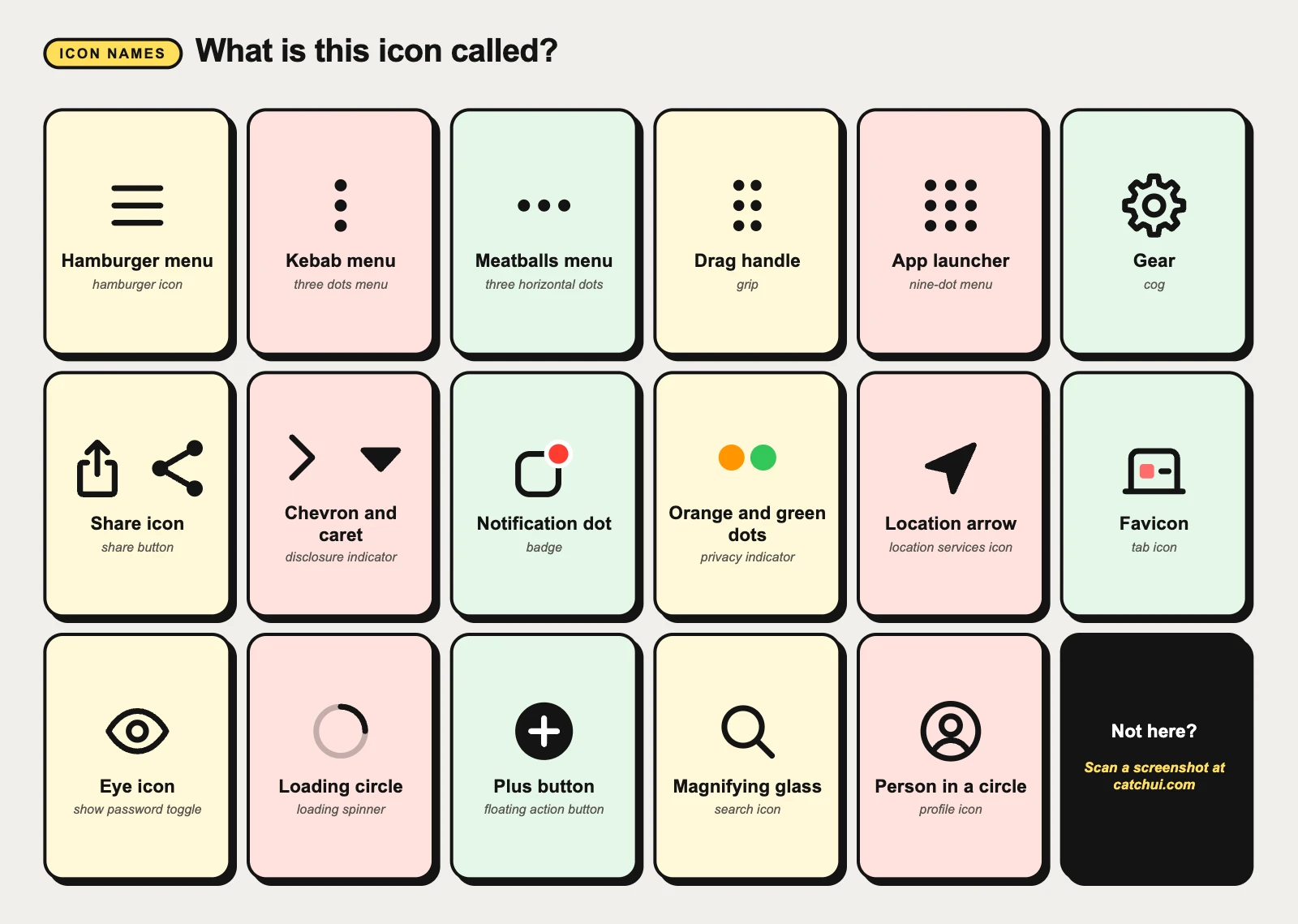
Each row gives the icon’s names in the two biggest icon sets, so you can ask for it in code: Material Symbols (Google’s, used in Android apps and on the web; Flutter’s built-in Icons class has the older Material Icons under the same names, such as Icons.more_vert) and SF Symbols (Apple’s, used in SwiftUI as Image(systemName: "ellipsis")).
Three lines, three dots, six dots, nine dots
The icons people ask about most have no words and no picture, only lines and dots. Each one has a name, and each opens something different.
Hamburger menu ☰
Also called: hamburger icon, menu icon, three-line menu, the three lines
Opens the main navigation of an app or website, usually in a panel that slides in from the side, the navigation drawer. It sits in a top corner, most often on phones and narrow windows where the links do not fit.
Three vertical lines (|||) at the bottom of a Samsung phone are the Recents button of the navigation bar. Three lines that get shorter usually mean filter or sort. On iPhone, three gray lines at the right of a row in edit mode are the reordering control: drag them to move the row.
In code: menu (Material Symbols) · line.3.horizontal (SF Symbols)
Kebab menu ⋮
Also called: three dots menu, three vertical dots, more options, overflow menu
Opens a short menu of extra actions for the screen or the item it sits on: share, rename, delete, settings. Android calls it the overflow menu. In Chrome the ⋮ at the top right is the browser’s main menu, which Google’s help pages call More.
In code: more_vert (Material Symbols)
Meatballs menu ⋯
Also called: three horizontal dots, more button, ellipsis button
The same job laid flat: more actions. Apple calls it the More button, and many iPhone apps draw the dots inside a circle; in Microsoft Edge the ⋯ at the top right is Settings and more.
Three dots that do something else: in a chat bubble while someone writes, the typing indicator; under a slideshow, pagination dots; pulsing while something loads, loading dots. In writing, three dots (…) are an ellipsis.
In code: more_horiz (Material Symbols) · ellipsis, ellipsis.circle (SF Symbols)
Drag handle ⠿
Also called: grip, gripper, six dots icon, drag indicator, reorder handle
Press and drag it to move the row, card or panel it belongs to; the other items slide apart to show where it will land. Material’s six-dot icon is named drag indicator.
Material’s icon named drag_handle is two horizontal lines (═). The short bar at the top of a bottom sheet is a handle too: Material calls it the drag handle, Apple the grabber.
In code: drag_indicator, drag_handle (Material Symbols)
App launcher
Also called: nine-dot menu, grid icon, waffle menu, Google apps menu, apps icon
Opens a panel of the company’s other apps. In Google’s products it is the Google apps menu, with Gmail, Drive, Calendar and the rest; in Microsoft 365 it is the app launcher, which Microsoft’s own help also calls the waffle menu, with Outlook, Word, Excel and Teams.
The screen that lists every app installed on an Android phone is something else: the app drawer, which Google’s help calls All Apps.
In code: apps (Material Symbols) · square.grid.3x3, circle.grid.3x3 (SF Symbols)
Settings, sharing and arrows
Three icons found in nearly every app, each drawn in more than one way.
Gear ⚙
Also called: cog, cogwheel, settings icon
Opens settings or preferences: for the whole app, or for the screen or item next to it. The Settings apps on iPhone and on Samsung Galaxy phones use a gear as their icon.
A row of sliders usually means filters or adjustments rather than settings.
In code: settings (Material Symbols) · gearshape, gear (SF Symbols)
Chevron and caret › ▾
Also called: disclosure indicator, dropdown arrow, expand arrow, down arrow
A › at the end of a row means tapping it opens another screen; Apple calls that gray chevron a disclosure indicator. A ⌄ or a small solid triangle (▾, a caret) beside a field or heading means it opens right there: a dropdown or an accordion, which often turns the arrow over while open. Between links, › separates the levels of a breadcrumb.
Caret is also the name of the blinking line where you type, the text cursor, which Apple calls the insertion point.
In code: chevron_right, keyboard_arrow_down, arrow_drop_down (Material Symbols) · chevron.right, chevron.down (SF Symbols)
Dots and arrows that tell you something
These are not buttons: they report what an app or the phone is doing.
Notification dot
Also called: badge, notification badge, red dot, unread count
Says something new or unread is waiting inside the app or tab; with a number, how many. iPhone calls it a badge, and you can turn it off app by app in Settings › Notifications. Android calls it a notification dot. On Apple Watch, a red dot at the top of the watch face means you have unread notifications.
In code: app.badge (SF Symbols)
Orange and green dots
Also called: privacy indicator, recording indicator, camera indicator, microphone indicator
Light up at the top of the screen while an app uses the microphone or camera. On iPhone and iPad, orange means the microphone, and green the camera, with or without the microphone; open Control Center to see which app. Android 12 and later show a green indicator at the top right; swipe down and tap it to see which app.
Location arrow
Also called: location services icon, navigation arrow, GPS arrow
At the top of an iPhone, in the status bar, the small arrow means an app is using your location. In a maps app the same arrow is the button that shows where you are; tap it again and the map turns to the direction you are facing.
In code: location.fill (SF Symbols) · near_me (Material Symbols)
More icons people ask about
The rest of the icons people search for by their shape.
Favicon
Also called: tab icon, site icon, website icon, shortcut icon
The little picture beside the page title in a browser tab. It also marks the site in bookmarks and next to its pages in Google’s search results.
In code: <link rel="icon"> (HTML)
Eye icon
Also called: show password toggle, password visibility toggle, password eye icon
At the end of a password field it shows what you typed as readable text; tap again to hide it. The icon switches between an open eye and one with a line through it.
In code: visibility, visibility_off (Material Symbols) · eye, eye.slash (SF Symbols)
Loading circle
Also called: loading spinner, throbber, activity indicator, spinning wheel, buffering icon
Spins while the app waits for something it cannot measure. Apple calls it an activity indicator and Material Design a circular progress indicator; an older web name is throbber. Three pulsing dots doing the same job are loading dots.
Plus button
Also called: floating action button, FAB, add button, compose button
A round or rounded-square button with a plus, floating over the content in a bottom corner, that starts the screen’s main task: a new message, note or event. Material Design calls it a floating action button.
In code: add (Material Symbols) · plus (SF Symbols)
Magnifying glass
Also called: search icon, search button
Search. Inside a field it marks the box to type in; on its own, tapping it opens a search field.
In code: search (Material Symbols) · magnifyingglass (SF Symbols)
Person in a circle
Also called: profile icon, account icon, user icon, avatar
Opens your account: profile, settings, sign out. Once you add a photo, the photo usually takes its place; either way designers call it an avatar.
In code: account_circle (Material Symbols) · person.crop.circle (SF Symbols)
Not on the list?
Take a screenshot and upload it to CatchUI: it boxes each element it recognises and gives its name, the visible evidence behind the match, and a card you can keep. For the bars and panels around apps, see what each part of a phone and computer screen is called; for the parts of a web page, what each part of a website is called.
Common questions
What is this icon called?
Match it by shape. Three lines (☰) is a hamburger menu; three dots is a kebab menu (⋮) or a meatballs menu (⋯); six dots is a drag handle; nine dots is an app launcher; a gear is settings; a square with an arrow pointing up is Share on iPhone and Mac, and three joined dots is Share on Android. If your icon is not here, take a screenshot and upload it to CatchUI to get its name.
What are the three dots called in an app?
An overflow menu, called a kebab menu when the dots are vertical (⋮) and a meatballs menu when they are horizontal (⋯). Tap it for more actions. In Chrome the ⋮ at the top right is the main menu, which Google’s help pages call More; in Microsoft Edge the ⋯ is Settings and more. Three dots in a chat bubble are the typing indicator, and in writing three dots are an ellipsis.
What is the icon with three lines called?
A hamburger menu (☰), also called the menu icon. It opens the app’s or website’s navigation, usually in a panel that slides in from the side. Three vertical lines (|||) at the bottom of a Samsung phone are a different button: Recents, which shows your open apps.
What is the icon with 9 dots called?
An app launcher: it opens a panel of the company’s other apps. Google calls it the Google apps menu; Microsoft 365 calls it the app launcher, and Microsoft’s own help also calls it the waffle menu. The screen that lists every app installed on an Android phone is something else, the app drawer.
What is the square with an arrow icon called?
With the arrow pointing straight up out of the square, it is the Share button on iPhone, iPad and Mac: it opens the share sheet, or on a Mac the Share menu. With the arrow pointing diagonally up and to the right, it is an external link icon: it opens the page in a new tab or another app.
What is the blinking line where you type called?
The caret, also called the text cursor; Apple calls it the insertion point. It marks where the next letter you type will appear. The I-shaped mouse pointer you see over text is a different thing, the I-beam pointer.